> ## Documentation Index
> Fetch the complete documentation index at: https://docs.surveystream.idinsight.io/llms.txt
> Use this file to discover all available pages before exploring further.
# Exotel Field Plug-in
## Overview
For phone surveys in India, [Exotel](https://exotel.com/) is a widely used third-party calling service. IDinsight provides a SurveyCTO field plug-in that makes it easier to use SurveyCTO, Exotel and SurveyStream together.
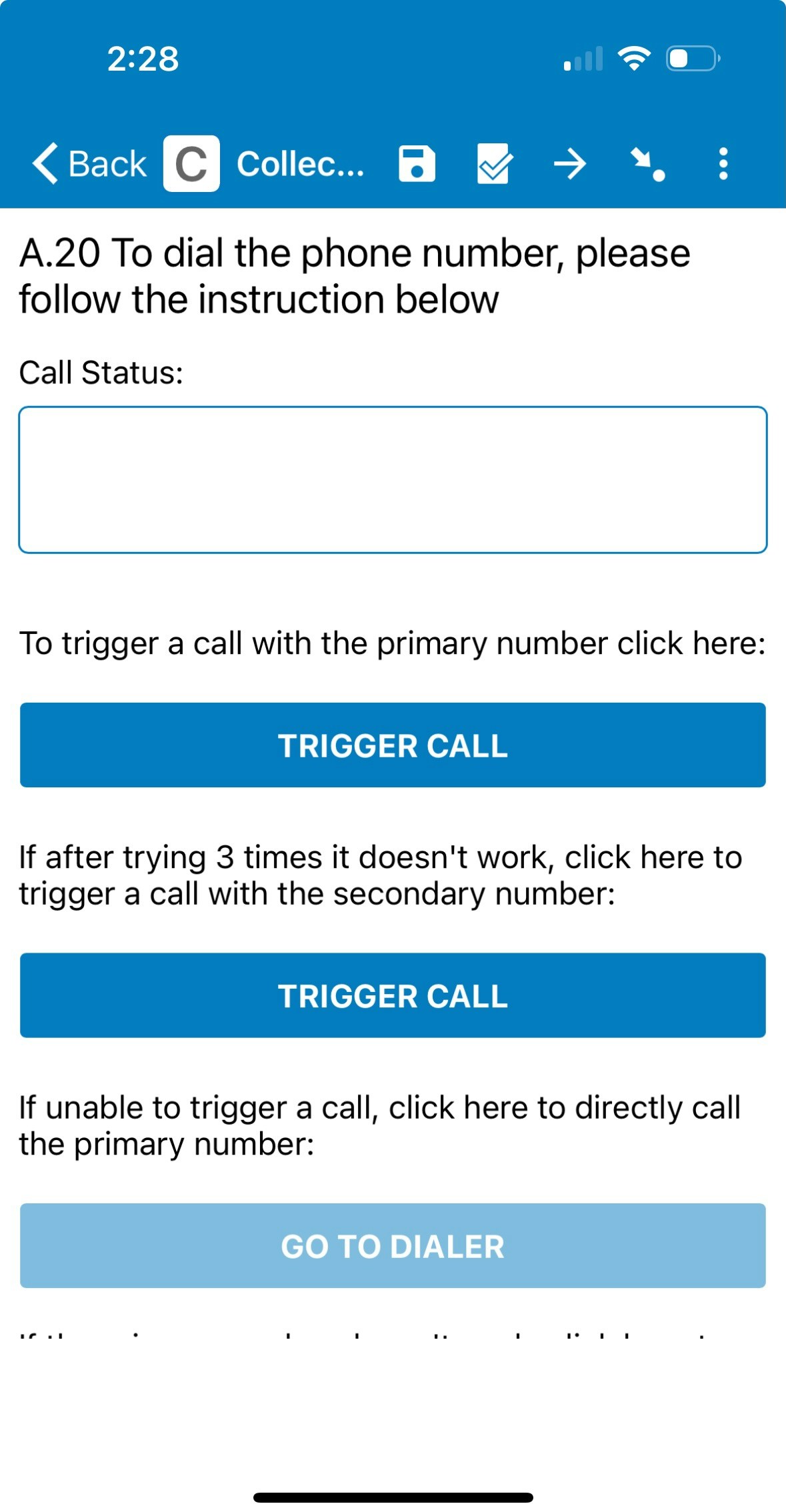
Using Exotel along with the Exotel field plug-in allows surveyors to initiate a phone call between themselves and the respondent by clicking a button in the SurveyCTO form. The advantage of using Exotel over direct calling is that it records both sides of the conversation and the Exotel recording can then be used for performing Audio Audits using the [Media Audits](/media_audits) feature on SurveyStream.
Exotel field plug-in screen with dialer button(s) for primary and secondary phone numbers:
For IDinsight teams, the SurveyStream team can provide access to our
organization's Exotel account. However, please note that your team is
responsible for adding credits, monitoring credit usage, and dealing with any
Exotel issues that might arise during your survey.
## Prerequisites
1. Understand how to work with SurveyCTO field plug-ins
Configuring a field plug-in is part of coding the SurveyCTO form. Check out [this documentation](https://docs.surveycto.com/02-designing-forms/03-advanced-topics/06.using-field-plug-ins.html) to better understand SurveyCTO field plug-ins.
2. Add credits on Exotel
Recharge Exotel with credits required for the survey. Exotel costs Rs. 0.60 per minute for calls, in addition to Rs 5,999 every 5 months to extend validity.
## Configuration
Use [this template](https://docs.google.com/spreadsheets/d/1P9Oq_rYW_7fhJNeqCjVVYhIFryW4gukdblUx1nhqTsE/edit?gid=775979269#gid=775979269) as a reference for the changes listed below:
1. Add a `calculate` field called `scto_stable_id` with calculation:
```
once(uuid())
```
This is the unique identifier used to link a SurveyCTO submission with the corresponding Exotel call recording.
2. Add `calculate` fields `hash_primary` and `hash_secondary` with calculations specified in the template
3. Add a `text` field to the form (called `dial_number_primary` in the template attached) with the following value in appearance:
```
custom-calling-service(
enum_number=${enum_phone},
primary_number=${primary_number},
secondary_number=${secondary_number},
primary_credential=${hash_primary},
secondary_credential=${hash_secondary},
caller_id=`EXOPHONE`,
status_callback="true",
scto_stable_id =${scto_stable_id},
primary_call_service_text="To trigger a call with the primary number click here",
secondary_call_service_text="If after trying 3 times it doesn't work, click here to trigger a call with the secondary number",
primary_dialer_text="If unable to trigger a call, click here to directly call the primary number",
secondary_dialer_text="If the primary number doesn't work, click here to directly call the secondary number"
)
```
Kindly note that:
* EXOPHONE is the placeholder for the Exophone number. Copy the 10-digit number (without hyphens), which can be found on your Exotel account. If you are using the IDinsight Exotel account, the Exophone number can be found [here](https://my.exotel.com/idinsight1/numbers).
* Update the referenced variables `${enum_phone}`, `${primary_number}`, `${secondary_number}`, `${hash_primary}`, `${hash_secondary}` and `${scto_stable_id}` to match the names you've given them in your form.
* If your form does not have secondary numbers, make the following changes to the parameter list in order to hide the secondary number buttons on the plug-in:
* Set secondary\_number=””
* Remove the secondary\_credential parameter
* If your form has a secondary number field, make sure to set missing values equal to “” so that the secondary number buttons on the plug-in will be hidden for households where there is no secondary number to call.
* Update the value in `primary_call_service_text`, `secondary_call_service_text`, `primary_dialer_text`, `secondary_dialer_text` to change the text displayed on the field plug-in screen (like to show the instructions in another language).
Download the field plug-in from [this Google Drive folder](https://drive.google.com/drive/u/2/folders/1MnMaapKfGAImfYpEiGqJbqUHJTXJko5h) and upload it to SurveyCTO as a form attachment.
Make sure to test the form after these changes to ensure that you are able to make calls successfully using the plug-in as expected.
## Additional Notes
Project teams have sometimes reported low call pick-up rates using Exotel probably because of the number getting marked as spam. The Exophone number can be updated in these cases to find a number which is not marked as spam. However, ensure that no other teams are using Exotel before making any changes.